Everything important about FamilyOrg
Answers to the questions families ask most often – from storage to cancellation.
What is FamilyOrg?
FamilyOrg helps families archive their important paper documents digitally and find them again instantly by searching. You photograph a document, the AI recognises and sorts it automatically – everything is stored in your own cloud.
How does FamilyOrg work, step by step?
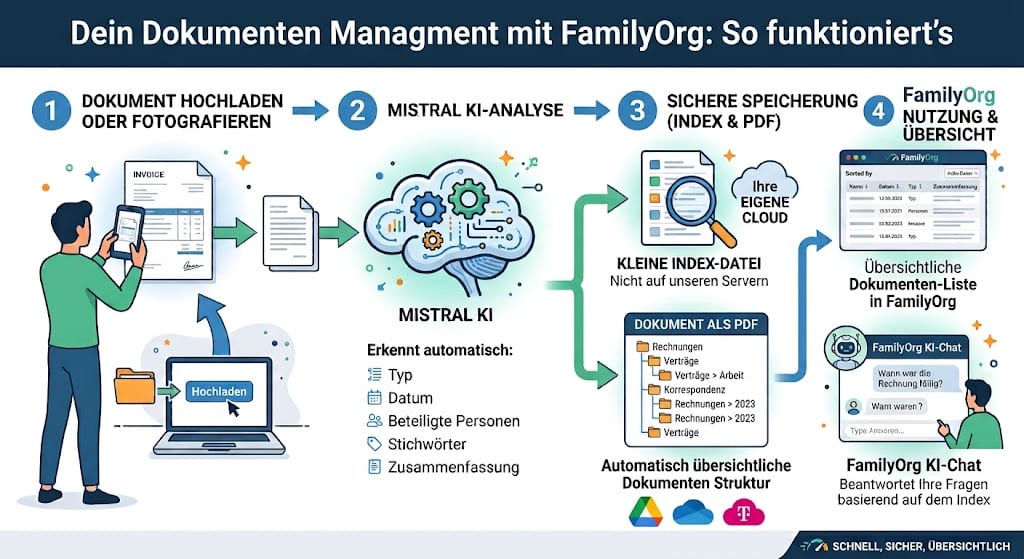
Here's how it goes: you photograph a document or upload it. Mistral's AI reads it and automatically recognises the type, date, people involved, keywords and a short summary. These summarised details are kept in a small index file that lives in your own cloud – not on our servers. The document itself is stored as a PDF in your chosen cloud storage (Google Drive, OneDrive or Magenta Cloud). In the documents overview you then see everything neatly sorted, built from exactly this index data. And in the AI chat, Mistral answers your questions about the documents – based on the same index.
Where are my documents stored?
Exclusively in your own cloud storage (Google Drive, Microsoft OneDrive or Telekom Magenta Cloud) – never permanently on our servers. For AI recognition a document only passes briefly through our service and is not stored there.
Can the provider see my documents?
No. Your papers stay in your cloud and under your control. We don't store your documents centrally and don't view their contents.
Which cloud storages are supported?
Google Drive, Microsoft OneDrive and Telekom Magenta Cloud. You connect your preferred storage in the settings with a few clicks.
How do I capture a document?
On your phone you simply photograph it with the camera; on a computer you upload a file or PDF. The AI reads the text and suggests a category, type and summary – you confirm or correct, done.
How do I find a document again later?
Via search or the AI chat: just ask a question like “When does my home contents insurance expire?” – instead of rummaging through folders, you get the right document in seconds.
What does FamilyOrg cost – and is there a free trial?
You test FamilyOrg for 14 days free (up to 5 documents). After that you decide freely: €4.99 per month or €49 per year. Without signing up there are no costs.
Can I cancel anytime?
Yes. Your subscription is monthly or yearly and can be ended anytime. Your already saved documents remain in your cloud.
What happens to my documents if I cancel?
Nothing is lost: because all documents live in your own cloud, they remain fully accessible to you even after cancellation.
Does FamilyOrg work on a phone? Can I install it as an app?
Yes. FamilyOrg runs in the browser and can be installed on the home screen – then it starts full-screen like a real app. You'll find an “Install app” hint on the dashboard.
Is FamilyOrg privacy-compliant?
Data protection is the core of FamilyOrg. It runs GDPR-compliant with servers in Germany; for AI recognition we use a European service (Mistral). Details are in our privacy policy.
Can the whole family use FamilyOrg?
Yes. You can add family members and assign documents to individual people – so you keep everyone's paperwork clearly in one place.
Still have questions? The easiest way is to try it yourself.
Try 14 days free →